
What Is Power BI Embedded Analytics? A Complete Guide
Table of Contents

Introduction
Microsoft’s Power BI is a powerful asset in business intelligence, offering organizations an effective platform to transform raw data into visually engaging and actionable insights. With its intuitive interface and robust features, Power BI enables users to create interactive reports and dashboards illuminating trends, patterns, and opportunities within their data.
Although Power BI excels at empowering users to build rich data visualizations, sharing these insights with a broader audience outside the organization’s immediate ecosystem without compromising security can present significant challenges. Extending access to reports and dashboards to clients, partners, or stakeholders who may not have direct access to the organization’s Power BI environment requires careful consideration of security, accessibility, and user experience.
Power BI offers embedded analytics solutions to address this challenge, allowing organizations to seamlessly integrate their Power BI assets—including reports, dashboards, and tiles—into web applications or websites. This capability opens new possibilities for organizations to deliver compelling data experiences to their end users and external third parties, enabling them to act based on the intelligence derived from the organizations’ data.
By leveraging Power BI Embedded Analytics, organizations can create custom-branded data experiences within their applications, ensuring smooth and consistent user interactions for their clients and stakeholders. Whether embedding reports into customer-facing portals, integrating dashboards into internal workflows, or sharing interactive data visualizations with external partners, Power BI Embedded Analytics provides the flexibility and scalability needed to meet the diverse needs of modern businesses.
Secure Embedding
Power BI Embedded Analytics Solutions
Power BI embedded analytics offers two solutions:
- Embed for Your Customers (where the App Owns the Data)
- Embed for Your Organization (where the User Owns the Data)
Embed for Your Customers
This solution caters to organizations seeking to extend and offer data analytics capabilities to external users, such as clients, partners, or customers. By leveraging implicit, automatic authentication against Power BI, organizations can build applications that seamlessly integrate embedded content without requiring viewers to sign in using Power BI credentials. This approach is particularly beneficial for independent software vendors (ISVs) developing applications for third parties. With Embed for Your Customers, external users can access reports without the complexity of managing Power BI credentials, resulting in easier, more straightforward application use.
Embed for Your Organization:
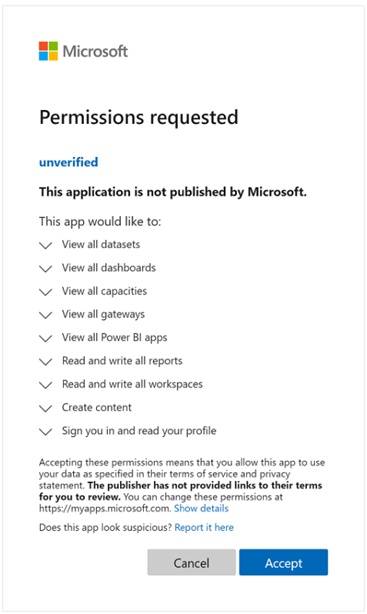
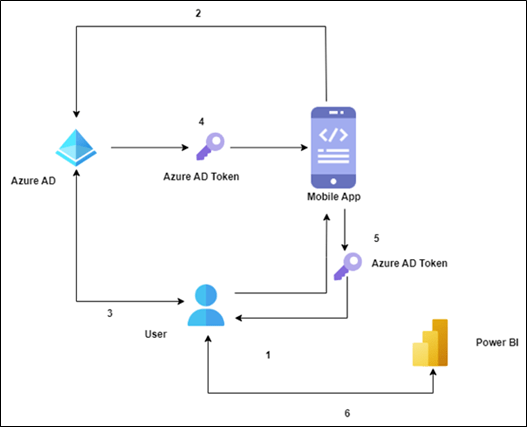
In contrast, Embed for Your Organization is suited for large organizations that want to provide their internal users with embedded analytic capabilities. This solution requires users to sign in using their Power BI credentials to access embedded content. Once authenticated, users access embedded reports and dashboards hosted on the Power BI service. Embed for Your Organization is ideal for companies looking to centralize data access and streamline analytics workflows within their internal applications. By requiring Power BI authentication, organizations ensure the security of sensitive data.
Microsoft Entra Token
Embed Token
In Embed for your Customer solution, the web app must know which Power BI content a user can access. The embed token REST API is used to generate an embed token, which specifies the following information:
- The content that the web app user can access
- The web app user’s access level (view, create or edit)
As described above, Embed for your Customer uses a non-interactive authentication flow for your customers’ solutions. Users do not sign in to Microsoft Entra ID to access Power BI. Instead, the web app uses a reserved Microsoft Entra Identity (Service Principal or Master User) to authenticate against Microsoft Entra ID and generate the embed token using the REST API.
Authentication Flows
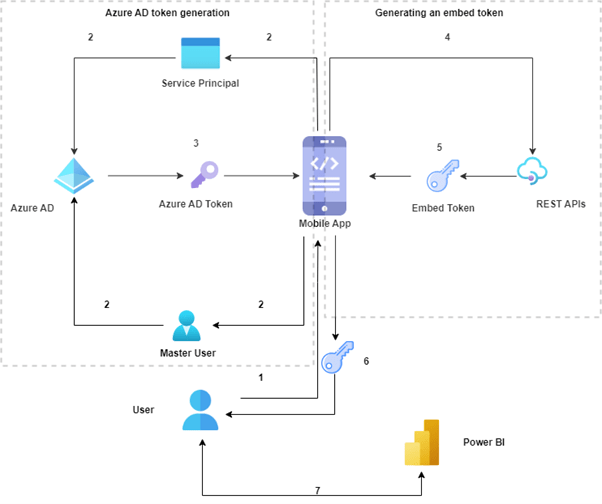
The following flow diagram shows the authentication flow for the Embed for your Customers’ solution
Conclusion
Ready to Unlock the Power of Embedded Analytics? Click here.
Contact OnPoint Insights today and discover how we can help you securely embed Power BI dashboards, reports, and data experiences into your applications to enhance decision-making and deliver greater value to your users.
For more insights, explore the OnPoint Insights Blog where we share practical tips on analytics, BI, data strategy, AI & ML, and more.
References

Collaborate with us
We're here to answer your questions and help you find the right solution.


"*" indicates required fields