Introduction
Microsoft’s Power BI is a powerful asset in business intelligence, offering organizations an effective platform to transform raw data into visually engaging and actionable insights. With its intuitive interface and robust features, Power BI enables users to create interactive reports and dashboards illuminating trends, patterns, and opportunities within their data.
Although Power BI excels at empowering users to build rich data visualizations, sharing these insights with a broader audience outside the organization’s immediate ecosystem without compromising security can present significant challenges. Extending access to reports and dashboards to clients, partners, or stakeholders who may not have direct access to the organization’s Power BI environment requires careful consideration of security, accessibility, and user experience.
Power BI offers embedded analytics solutions to address this challenge, allowing organizations to seamlessly integrate their Power BI assets—including reports, dashboards, and tiles—into web applications or websites. This capability opens new possibilities for organizations to deliver compelling data experiences to their end users and external third parties, enabling them to act based on the intelligence derived from the organizations’ data.
By leveraging Power BI Embedded Analytics, organizations can create custom-branded data experiences within their applications, ensuring smooth and consistent user interactions for their clients and stakeholders. Whether embedding reports into customer-facing portals, integrating dashboards into internal workflows, or sharing interactive data visualizations with external partners, Power BI Embedded Analytics provides the flexibility and scalability needed to meet the diverse needs of modern businesses.
Secure Embedding
Secure Embedding provides the simplest no-code way to embed a report into any portal that accepts a URL or iFrame. Viewers must have a valid Power BI license to access the report. While they can interact with the report, they are restricted from editing or saving it. Secure embedding is available in the Power BI service. (1)
Power BI Embedded Analytics Solutions
Power BI embedded analytics offers additional benefits over Secure Embedding, providing a rich, fully integrated experience with full API support, automatic authentication, and the ability to host Power BI assets (reports, dashboards, tiles) in apps and web pages. This solution allows organizations to automate analytics monitoring, management and deployment while retaining full control of Power BI features and intelligent analytics. It can even extend to tasks like automated emails with Power BI(2)
Power BI embedded analytics offers two solutions:
- Embed for Your Customers (where the App Owns the Data)
- Embed for Your Organization (where the User Owns the Data)
Embed for Your Customers
This solution caters to organizations seeking to extend and offer data analytics capabilities to external users, such as clients, partners, or customers. By leveraging implicit, automatic authentication against Power BI, organizations can build applications that seamlessly integrate embedded content without requiring viewers to sign in using Power BI credentials. This approach is particularly beneficial for independent software vendors (ISVs) developing applications for third parties. With Embed for Your Customers, external users can access reports without the complexity of managing Power BI credentials, resulting in easier, more straightforward application use.
Embed for Your Organization:
In contrast, Embed for Your Organization is suited for large organizations that want to provide their internal users with embedded analytic capabilities. This solution requires users to sign in using their Power BI credentials to access embedded content. Once authenticated, users access embedded reports and dashboards hosted on the Power BI service. Embed for Your Organization is ideal for companies looking to centralize data access and streamline analytics workflows within their internal applications. By requiring Power BI authentication, organizations ensure the security of sensitive data.
Microsoft Entra Token
Consumption of Power BI content is regulated through the use of access tokens. Depending on which of the two solutions described above is leveraged, this token can be either a Microsoft Entra token, an embed token or both. In the Embed for your Customer’s solution, where the app owns the data, the application generates an embed token that grants web users access to Power BI content. In the Embed for your Organization solution, where the user owns the data, web app users authenticate against Microsoft Entra ID using their credentials. Users can access the Power BI content they have permission to on the Power BI service. (3)
For both solutions, a Microsoft Entra token is required for all REST API operations, and its validity lasts an hour.
- In the Embed for your Customers solution, this token generates the embed token.
- In the Embed for your Organization solution, it is used to access Power BI.
Embed Token
In Embed for your Customer solution, the web app must know which Power BI content a user can access. The embed token REST API is used to generate an embed token, which specifies the following information:
- The content that the web app user can access
- The web app user’s access level (view, create or edit)
As described above, Embed for your Customer uses a non-interactive authentication flow for your customers’ solutions. Users do not sign in to Microsoft Entra ID to access Power BI. Instead, the web app uses a reserved Microsoft Entra Identity (Service Principal or Master User) to authenticate against Microsoft Entra ID and generate the embed token using the REST API. (4)
Authentication Flows
- Service Principal (SP) is used to authenticate against Microsoft Entra ID and get an app-only Microsoft Entra Token. Power BI API access in the Power BI service admin settings needs to be enabled when using an SP. Enabling access allows the web app to access the Power BI REST APIs. The SP needs to be a member or an admin to use API operations on a workspace.
- The web app uses a master user account to authenticate against the Microsoft Entra ID and get the Microsoft Entra Token. When a master use account is used, the app’s delegated permissions need to be defined. The master user or tenant admin must consent to these permissions when using Power BI REST APIs.
The following flow diagram shows the authentication flow for the Embed for your Customers’ solution.

- User Authentication:
App users sign in using the app’s authentication method. - App Authentication:
The app uses a service principal or a master user to authenticate against the Microsoft Entra ID. - Token Retrieval:
The app gets a Microsoft Entra token from the Microsoft Entra ID to access Power BI REST APIs. - Embed Token Request:
The app calls an Embed Token REST API to request the embed token specifying the Power BI content to embed. - Token Retrieval:
The REST API returns the embed token to the web app. - Token Passing:
The app passes the embed token to the user’s web browser. - Accessing Power BI:
Users use the embed token to access Power BI.
As described above, this solution involves an interactive authentication flow. App users authenticate against Microsoft Entra ID using their Power BI credentials.
When registering the app with Entra ID, users must consent to the API permissions set. A Microsoft Permissions Requested dialogue window asks users to grant these permissions. After consent is granted, the user can embed the Power BI content to which the user has the required rights.
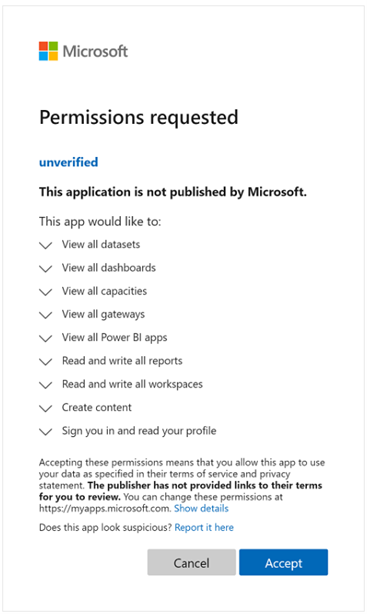
The following flow diagram shows the authentication flow for the Embed for your Customers’ solution

- User Access:
The user accesses the web app. - Authentication Process:
The web app redirects the user to the Microsoft Entra ID. - Authentication Completion:
The user authenticates themselves using their Power BI credentials. - Token Retrieval:
Microsoft Entra ID redirects the user back to the Microsoft Entra token. An access token is returned to the user’s browser in the implicit grant scenario. - Token Passing:
The web app passes the Microsoft Entra token to the user’s browser. - Power BI Integration:
The Power BI web app embeds content using the Microsoft Entra token. Only content that the user has permission to is embedded.
Ready to Unlock the Power of Embedded Analytics? click here.
Contact OnPoint Insights today and discover how we can help you securely embed Power BI dashboards, reports, and data experiences into your applications to enhance decision-making and deliver greater value to your users.
For more insights, explore the OnPoint Insights Blog where we share practical tips on analytics, BI, data strategy, AI & ML, and more.
References: